SHIPYARD
Shipyard is a station service that allows CMDRs to buy, store, transfer and sell ships. In addition, outfitting is a station service made available to all CMDRs that wishes to purchase, upgrade, and sell modules from their ships. CMDRs also have the option to store modules, manage them and transfer these modules from stations to stations. Outfitting services can be accessed in the Starport Services menu.
OUTFITTING
Modules that make up a ship’s internals help defines its specializations. Internal modules are split into Core and Optional Internals. Core Internals are required to run the ship basic functionality, while Optional Internals help supplement the specialization of the ship’s purposes.
GRADE AND SIZE
All modules comes in a Size and a Grade, whereby the Grade of the module determines the quality of the module. Usually, the rating of the module is denoted as:
- A-rated : Best Grade module in the same size module family.
- B-rated : Heaviest module in the same size module family.
- C-rated : Mid-Grade module in the same size module family.
- D-rated : Lightest module in the same size module family.
- E-rated : Worst Grade module in the same size module family.
The increase in size of the modules are intervals of higher quality. An E-rated module of a size higher is of better grade than an A-rated module of a lower size.
CORE INTERNALS
There are 8 core internal modules a ship must have to operate at its minimum. These modules are:
- Armor Bulkheads
- Power Plant
- Thrusters
- Frame Shift Drive
- Life Support
- Power Distributor
- Sensors
- Fuel Tank
ARMOR BULKHEADS
Armor is the ship’s overall hull protection, and by default, all ships comes with lightweight alloys. There are three levels of hull protection, with three specialized high-end armor types.
- Lightweight Alloy : The defaulted armor that comes standard all ships. This module does not carry any additional mass to the ship, nor does it benefit the ship if it comes under attacks.
- Reinforced Alloy : The mid-tier armor that is cheaper to fit but does not protect as much than the stronger Military-Grade composite armor.
- Military Grade Composite : The standard high-end armor used in most combat situations. This is also the cheapest combat-grade armor to fit.
- Mirrored Surface Composite : This specialized Military-Grade composite counterpart only resists damage from thermal damage, but is weak towards kinetic and explosive weapons.
- Reactive Surface Composite : This specialized Military Grade composite counterpart only resists damage from kinetic and explosive damage, but is weak towards thermal weapons. This is the most expensive armor you can purchase for your ship.
SPECIAL CONSIDERATIONS
- in PvE, purchasing Military Grade Composite armor is sufficient enough provided that enough modified hull reinforcement packages are used to balance out the resistances. This in favors benefits the rebuy costs of the ship making it very cheap to insure.
- in AX combat, Military Grade Composite is all that’s needed as damage from Thargoids deals absolute damage and completely ignores resistances.
- in PvP, both mirrored surface composite and reactive surface composite are used in both organic and organized duels, it depends on:
- if the ship is a shield tank, Lightweight Alloy allows the ship to be more nimble and faster, Military Grade Composite helps boost the overall hull strength, Mirrored Surface Composite helps boost the thermal resistances of a ship’s hull and hull strength.
- if the ship is a hull tank, a balanced resistance, hull oriented ship is preferred and to achieve this, Reactive Surface Composite is used with a modified small hull reinforcement package with thermal resistant modifications along with other heavy duty modified hull reinforcement packages.
- all bulkhead engineering modifications benefit greatly from the Heavy Duty blueprint modification with the Deep Plating experimental.
POWER PLANT
Power plants are responsible in producing enough power to utilize all of your ship’s basic and specialized functionalities. Depending on the quality grade and size of the power plant, those characteristics determines what will determine the integrity of the power plant, which is a reserve of how much damage a power plant can take before the ship implodes, and how much power it produces in Megawatts. You cannot disable this module.
POWER PRIORITY MANAGEMENT
Power priority is a power management tool that gives power based on priority when all modules are overpowering the power plant’s power reserves. Having weapons being deployed are a common reason why you get power overloading as these weapons end up taking a portion of power needed to operate all other modules. By assigning them a power priority, they can automatically shutdown to allocate power for combat-relevant modules.
The priorities you have range from 1-5; 1 being the most important, 5 being the least important. It is recommended that combat ships follow this order of power priorities per module. Planning power priorities with Coriolis.io or ED Shipyard is recommended if you are not sure how to properly set these power priorities. If you are importing builds from Inara into Coriolis, power priorities will be incorrectly set.
- Core internals (thrusters, power distributor, life support, sensors) & weapons
- Defensive modules (shield generator, main SCBs in use, boosters)
- Travel modules (frame shift drives, fuel scoops)
- Utility tools or extra modules (extra SCBs, heat sinks, AMFUs)
- Non-combat relevant modules (FSD interdictor, cargo hatch, assist computers)
THERMAL LOADING
Every power plant has an efficiency rating that depending on the modifications being applied on the power plant can benefit or damage its heat generation, the lower the efficiency rating, the cooler the ship performs. Efficiency ratings goes as low as 0.13 with a modified A-rated low-emissions power plant with thermal spread, while the worst rating it can reach is with a modified E-rated overcharged power plant at a rating of 1.25.
Heat generation of a ship is not only based on the efficiency rating of a ship’s power plant, but are also in lined with the modules that produce heat as well as a ship’s thermal loading.
GUARDIAN POWER PLANT
There is a Guardian version to the original Power Plant whereby the module is unlocked permanently when supplying a Guardian Technology Broker with the required materials Guardian Power Plants are better than the original module however is worse than any engineered Power Plant module. The Guardian Power Plant generates as much power as a mid-tiered Grade 4 Overcharged Power Plant while its thermal efficiency is as bad as a Grade 5 Overcharged Power Plant. The module is useful to equip on ships having the module supply more power without engineering, however, its easily worse in comparison to its engineered counterparts.
POWER PLANTS FACTS
- Should your Power Plant be severely damage, performing a reboot and repair would consume healthy modules to restore unhealthy modules. If all of your other modules are healthy except the Power Plant, performing a reboot repair will help repair your power plant’s health.
- Power Plants do not take heat damage.
SPECIAL CONSIDERATIONS
When outfitting ships, the power plant should always be A-rated. You may choose to downsize, but whatever size of the power plant, it should be A-rated.
For Power Plants, it is always recommended to go with the Armoured modifications. Both the Monstered and Thermal Spread experimental are nice to apply depending if you need the extra boost in power capacity, or wants to remain relatively cool.
Low Emissions are a nice to have modification applied in some stealth builds, in exploration and station rescue builds. For the Overcharged modification only apply the lowest grade for the amount of power capacity that you need. Overcharged modifications makes the ship run hot as well as reducing module integrity.
THRUSTERS
Thrusters are responsible for providing maneuverability for the ship to fly from places to places. Thrusters behave differently in Flight Assist on and off, where in Flight Assist on, the thrusters are sustained which will force the ship to readjust to a stable axis of rotation. In Flight Assist off, the thrusters are not sustained and all readjustments are made by the CMDR controlling the ship. Disabling this module will disable all thrust capabilities of a ship.
To learn more about Flight Assist Off check out Moxen Wolf’s Playlist.
SPECIAL CONSIDERATIONSFor Thrusters, only the Dirty Drives modification is recommended with the Drag Drives experimental. If you are doing a stealth build, the same recommendation applies as Clean Drives benefit cool downs only during boosts but remains hotter than Dirty Drives during normal operation use.
FRAME SHIFT DRIVE
Frame Shift Drive is the module that’s responsible for you to jump from systems to systems and in between stations and planetary bodies in systems without sub-light year travels.
MAX, UNLADEN, LADEN
You’ll notice in your ship’s outfitting statistics, there is numbers for Max Jump Range, Unladen Jump Range, Laden Jump Range.
- Max Jump Range is the ship’s theoretical jump range with the most optimal specifications.
- Unladen Jump Range is the ship’s dry jump range, meaning how far the ship jumps without stored cargo.
- Laden Jump Range is the ship’s jump range with cargo in the ship. Laden Jump Range is also the range of your ship currently which should be used when plotting a course in a 3rd party route plotter.
PRE ENGINEERED FRAME SHIFT DRIVE
Since November 2020 or 3306, a pre-engineered version of the 5A Frame Shift Drive was introduced in the Coalsack Nebula AX Support community goal as a part of the Azimuth saga. This pre-engineered version featured a double engineered Fast Boot and Increased Range base modification to the frame shift drive, which boosted the optimal mass factor from 55% to 70%. Later, pre-engineered versions of the 3A, 4A and 6A Frame Shift Drive where introduced from the Colonia Megaship Expansion community goals.
Fast Boot is a blueprint modification that allows the Frame Shift Drive to reboot quicker from 10 seconds to 2 seconds. Fast Boot doesn’t impact the charge up time of Frame Shift Drives on Low and High wakes.
To unlock the Pre Engineered 5A Frame Shift Drive, you are required to collect the following materials to purchase only ONE module. To buy more, you’ll need more of the same materials.
- 18 Datamined Wake Exceptions
- 26 Tellurium
- 26 Electrochemical Arrays
- 28 Chemical Processors
No other sizes of the pre-engineered Frame Shift Drive are available for purchases. However, there are 14 ships that uses a max size 5 Frame Shift Drive. If you are building a ship using pre-engineered stats, then change the Frame Shift Drive’s optimal masses to:
- Pre-engineered 3A Frame Shift Drive : 255.0 T
- Pre-engineered 4A Frame Shift Drive : 892.5 T
- Pre-engineered 5A Frame Shift Drive : 1785.0 T
- Pre-engineered 6A Frame Shift Drive : 3060.0 T
SUPERCRUISE OVERCHARGE (SCO)
Since April 2024, Achilles Aerospace sells SCO Frame Shift Drives in sizes 2-7, rated E to A. Press boost in supercruise to overcharge and travel much faster, at the cost of extra fuel and heat. SCO drives can be engineered with Increased Range, Faster Boot Sequence and Shielded, and they take every FSD experimental effect. Newer ships such as the Python Mk II are designed around SCO and cope with the strain better.
The Anaconda Mk II (ARX Early Access since 20 October 2026) also has SCO built in. See our Anaconda Mk II page for its stats and price.
LOW AND HIGH WAKING
In a Frame Shift Drive, you are able to charge your Frame Shift Drive in two ways:
- Low Waking refers to charging your frame shift drive to jump into supercruise to get between celestial bodies within relative quick times.
- High Waking refers to charging your frame shift drive to jump into hyper space to jump from systems to systems.
A Frame Shift Drive charging for a low wake usually takes lesser time than a Frame Shift Drive charging for high wakes. However the charging rates of a low wake is usually impaired by the Mass Lock Factors of a ship should there be other ships near by. Mass Lock Factor is a multiplier that every ship has that slows down the charging rate of a low wake frame shift charge within a 3-5 km radius of the ship’s relative position.
If the ships around you all have a smaller or equal value in their respective mass lock factor, you will charge your frame shift drive much quicker. However, if you are surrounded by heavier ships, your mass lock factor will be affected by the ship with the highest mass lock factor and therefore slowing down the charge.
SPECIAL CONSIDERATIONS
The recommended engineering blueprint modification to put on any Frame Shift Drive is Increased Range with Mass Manager. Some may speculate that Deep Charge is more beneficial for smaller ships with Frame Shift Drive sizes 4 and smaller, however the Deep Charge modification consumes more fuel than Mass Manager and benefits the jump range by ~ 0.4%.
If you purchase a pre-engineered Frame Shift Drive, do not override the base modifications as you’ll lose its double engineered stats.
LIFE SUPPORT
Life support is a module that provides a safe breathing environment for the CMDR piloting the ship. Life support is an essential piece of equipment where without it can incapacitate the CMDR into redeployment. Life support can go into an emergency state when:
- the canopy compromises
- the life support module is damaged
Depending on the quality grade of the Life Support, will determine the span of time the emergency life support will run for. It will span from 5 minutes from the lowest E-rated Life Support module to 25 minutes from an A-rated Life Support. Most CMDRs will equip a D-rated Life Support for any ship specializing in any field apart from AX combat.
The Life Support is not the canopy. Engineering the Life Support will not strengthen the canopy. The Canopy is a separate module that requires Module Reinforcement Packages to strengthen the canopy from breaching.
SPECIAL CONSIDERATIONS
Engineering Life Support is not really required on all builds. However if you do choose to engineer the Life Support choose the Lightweight blueprint modification.
POWER DISTRIBUTOR
Power Distributor is a module that supplies energy from the power plant to modules belonging underneath sub-systems categories of Systems, Weapons and Engines. The Power Distributor is represented by capacitors with 4 dots at the bottom of each capacitor and is all controlled by the CMDR. Capacitors help replenish expenditure of energy consumed by modules that rely on those capacitors. When a Power Distributor malfunctions the PIPs will randomly toggle different PIP settings making it difficult to PIP manage. Disabling a Power Distributor will prevent you from shifting PIPs around, however the recharge functionality still works. The recharge rate of a capacitor will remain at the setting it was at before the disabling the module.
PIP MANAGEMENT
PIP management redirects how much energy gets transferred from the power plant and into the power distributor’s capacitors which can greatly help optimize your ship’s usage and effectiveness. In combat situations, adequate PIP management is an important fundamental that elongates the survivability of one’s ship.
-
Redirecting PIPs to SYS
makes your shields take less damage from every hit, compared with 0 pips: 60% less with 4 pips, about 33% less with 2 pips, so the same shield lasts about 2.5x as long with 4 pips and about 1.5x as long with 2 pips
as long as there is energy in the SYS capacitor, the shield generator will be able to recharge -
Redirecting PIPs to ENG
helps optimize the ability to turn at a higher speed and gives your ship more maneuverability
helps reduce boost recharging rates after the boost consumes energy -
Redirecting PIPs to WEP
helps reduce thermal loading of all weapons
reduces energy consumption from heavy consumption rate weapons like lasers, plasma accelerators and rail guns
Although the PIPs themselves are not important other than they provide the rate of recharge of each capacitor and the Systems PIPs receiving a shield buff factor, all the capacitors are essentially an energy reserve pool. All of the modules that benefit from that capacitor, consumes it. If there is energy in that capacitor, then the modules can be utilized more. For example, if there is remaining energy stored in the capacitor, then the shields will recharge. The more you upkeep shifting energy into the Distributor’s respective capacitors, the longer your ships can sustain in combat.
GUARDIAN POWER DISTRIBUTOR
Just like the Guardian Power Plant, the power distributor also gets a Guardian version. It performs the same as a mid-tier Grade 3 Charged Enhanced Power Distributor. And just like the Guardian Power Plant, you are required to supply the Guardian Technology Broker with all the necessarily materials to unlock the module permanently.
SPECIAL CONSIDERATIONS
When engineering your Power Distributor, capacity usage are generally dictates how efficient or optimized the ship’s functionalities are running at. The only engineering blueprint modification that’s recommended for any Power Distributor is the Charge Enhanced modification with Super Conduits.
Any capacitor focused modification is generally not recommended, this including the Weapons Focused modification. Bigger capacitors are generally worse than smaller capacitors that gets regenerated at a quicker rate. Although logically, one might assume that a bigger capacitor drains energy slower, and therefore prolonging the optimizations a ship might need to perform optimally. However it takes longer for the PIPs to redirect energy and refill the capacitor back up therefore extending the time needed to maintain that capacitor, resulting in poor maintenance of the other capacitors. Weapon Focused is preferred by many pilots who likes to face tank and gib their NPC targets as fast as they could manage. Although this modification is a one-off, specialized to big ships only, it is not the most optimal combat flight style to use generally.
SENSORS
Sensors are the eyes of the ship. Sensors passively scans and locate objects’, ships’ and anomalies’ positions relative to the ship’s position and displays them on the mini-map located in the center of the HUD. Sensors are important as they allow you to target and interact with your targets. Upgrading a sensor will only improve its passive scanning range. Disabling sensors will also prevent the tracking assists functionalities of gimballed and turreted weapons.
You can target anything that has a relative heat signature, unless that is an anomaly or object which can be targeted regardless. You cannot target a ship when a ship’s heat signature is below 20% heat or they have toggled silent running.
SPECIAL CONSIDERATIONS
Engineering sensors are not really needed, as the two primary modifications used for A-rated and D-rated sensors are Lightweight and Increased Range engineering blueprint modifications.
FUEL TANK
Fuel tank is the main reservoir of a ship’s fuel. Fuel is used to power the Power Plant to power all modules on a ship. It is also consumed by the Frame Shift Drive when you jump between systems. Your fuel gauge is located on the far right of the main HUD display. You’ll notice three components:
- the top will have a number indicating the rate of consumption, usually higher for combat ships
- the thin line indicates the consumption of one tonne of fuel
- the thick line indicates the total fuel reservoir stored on your ship
OPTIONAL INTERNALS
Optional Internals are the slots dedicated to specializing your ship’s purpose. There exists a long list of optional internals that you can purchase from the outfitting services.
- Auto Field Maintenance Unit
- Frame Shift Drive Interdictor
- Guardian Frame Shift Drive Booster
- Cargo Racks
- Passenger Cabins
- Fuel Equipment
- Limpet Controllers
- Shields and Shield Cell Banks
- Refinery
- Structural Reinforcements
- Hanger Bays
- Flight Assist Modules
- Detailed Surface Scanners
AUTO FIELD MAINTENANCE UNIT
The Auto Field Maintenance Unit, often called the AMFU, is a module that repairs a module’s integrity. The AMFU has a pool of repair points that fix the healthiness of a module. The AMFU’s pool can be replenished by synthesizing materials. The AMFU repairs all modules, including the canopy but is unable to directly repair the Power Plant.
Just note that a B-rated AMFU might have more repair points than an A-rated AMFU, but it repairs much slower.
FRAME SHIFT DRIVE INTERDICTOR
The Frame Shift Drive Interdictor is a module that pulls targets out from supercruise and forces them to normal space flight. You can only fit one of this module onto any ship. When you pull someone out from supercruise you’ll enter a tug-of-war mini game where the objective of the mini-game is to force the target out of supercruise. In the mini-game you’ll see a blue bar and a red bar. Your objective is keeping the interdictor reticle on the target until the blue progress bar fills up.
- if your target submits before the blue progress bar fills up, both of you and your target will drop with a 10 second Frame Shift Drive cool down period
- if you successfully interdict your target, both of you and your target will drop with a 30 second Frame Shift Drive cool down period
- if you failed to interdict your target, only you will drop out and have a Frame Shift Drive cool down penalty of 30 seconds
GUARDIAN FRAME SHIFT DRIVE BOOSTER
Guardian Frame Shift Drive Booster is an additional module that provides a fixed jump range increase to your current jump range. You can only fit one of this module onto any ship. There are 5 sizes of the Guardian Frame Shift Drive Booster:
- size 1 : 4.00 Lyrs additional
- size 2 : 6.00 Lyrs additional
- size 3 : 7.75 Lyrs additional
- size 4 : 9.25 Lyrs additional
- size 5 : 10.5 Lyrs additional
CARGO RACKS
Cargo racks stores units of commodities inside of your ship. Cargo racks comes in sizes from size 1 to size 8, each size class having double in size of the size underneath it. So a Size 5 cargo rack has a storage size of 32 tons, meaning a Size 6 cargo rack has a storage size of 64 tons.
CORROSIVE RESISTANT CARGO RACKS
Corrosive Resistant Cargo Racks (CRCR) are a type of cargo racks that negates caustic damage taken when holding Thargoid-related salvage. Currently, only a Size 4 CRCR, can be unlocked by providing the necessary materials to a Human Technology Broker. A Size 6 and Size 5 CRCR was made available to CMDR as a reward obtained from a Community Goal. You can also obtain a size 1 CRCR from Professor Palin’s research lab in Arque that has a cargo capacity of only 1 and 2 tons for F and E grades respectively.
PASSENGER CABINS
Passenger Cabins, much like Cargo Racks, houses passengers instead of commodities. Passenger Cabins comes in 3 grades, Economic, Business and First Class, ranging in modules of grades E, D and C respectively. Only the Luxury Passenger Cabin that’s available on Saud Kruger ships, that comes only in size 5’s and up.
FUEL EQUIPEMENT
You can add more fuel-related modules to help benefit your exploration journey. You can fit additional Fuel Tanks or you can replenish your fuel expenditures by using a Fuel Scoop.
FUEL SCOOPING
Fuel Scooping is a module that replenishes the fuel in your fuel tanks. Fuel scooping can only be done in supercruise. By orbiting close to the body of a fuel scoopable star, near its exclusion zone, fuel is automatically collected into the ship’s total fuel reservoir. You can only fit one of this module onto any ship.
LIMPET CONTROLLERS
There are currently 8 specialized limpet controller modules with 5 independent multi-limpet controller modules variants. Should there be an engineering modification made available for the limpet controller, the Lightweight engineering blueprint modification is always recommended.
- Collector Limpet Controller
- Fuel Transfer Limpet Controller
- Hatch Breaker Limpet Controller
- Prospector Limpet Controller
- Repair Limpet Controller
- Recon Limpet Controller
- Decontamination Limpet Controller
- Research Limpet Controller
- Universal Multi-Limpet Controller
- Operations Multi-Limpet Controller
- Xeno Multi-Limpet Controller
- Rescue Multi-Limpet Controller
- Mining Multi-Limpet Controller
COLLECTOR LIMPET CONTROLLER
Collector Limpets collects abandoned commodities, raw materials, mining fragments and salvage. Sizes of the limpet controller determines the maximum amount of collectors that gets sent out, while the grade quality determines the range of how far a Collector Limpet scans for objects to pick up.
- you can blacklist certain things that’s being collected by the collector limpet
- only things that are whitelisted will the collector limpet collect it
- selecting an object then launching a limpet will force the limpet to collect only that targeted item and expire
FUEL TRANSFER LIMPET CONTROLLER
Fuel Transfer Limpets transfer one ton of fuel from your ship to the targeted ship.
HATCH BREAKER LIMPET CONTROLLER
Hatch Breaker Limpets forces the cargo rack to eject commodities.
PROSPECTOR LIMPET CONTROLLER
Prospector Limpets are used in Mining to help determine the mineral composition of an asteroid, it determines if the asteroid has surface deposits, sub-surface deposits, a mineral core or an asteroid that can be mined with using lasers only.
REPAIR LIMPET CONTROLLER
Repair Limpets repair hull strength. Repair Limpets can also damaged canopies, however it cannot fix compromised canopies. The amount a Repair Limpet can fix is determined by its size. The quality grade of a Repair Limpet only determines the range of the Repair Limpet’s coverage.
RECON LIMPET CONTROLLER
Recon Limpets hack data from hackable data terminals. The size of the controller determines the hacking time, while the quality grade of the limpet controller determines the range of cover of that Recon Limpet.
DECONTAMINATION LIMPET CONTROLLER
Decontamination Limpets are used if the ship is damaged by an caustic effect applied on them. Caustic effects can only be applied from Thargoid Caustic Missiles or temporarily from Enzyme Missiles. The size of these limpet controllers determine the distance and maximum number of limpets that can be deployed at once.
RESEARCH LIMPET CONTROLLER
Research Limpets samples tissue from biological creatures and brings them back to the ship and stores it in the cargo hold. If you sample a Thargoid using a Research Limpet Controller, make sure to have adequate cargo racks to contain caustic commodities.
UNIVERSAL MULTI-LIMPET CONTROLLER
Universal Multi-Limpet Controllers are able to program all 8 limpet controllers with overall lower qualities compared to their more specialized controller counterparts. Comes in size 7 modules only. You can only fit one of this module onto any ship.
OPERATIONS MULTI-LIMPET CONTROLLER
Operations Multi-Limpet Controllers are able to program Collector, Hatch Breaker, and Recon Limpet functions. Comes in size 3 modules only.
XENO MULTI-LIMPET CONTROLLER
Xeno Multi-Limpet Controllers are able to program Decontamination, Repair, and Research Limpet functions. Comes in size 3 modules only.
RESCUE MULTI-LIMPET CONTROLLER
Rescue Multi-Limpet Controllers are able to program Fuel Transfer, Hatch Breaker, and Repair Limpet functions. Comes in size 3 modules only.
MINING MULTI-LIMPET CONTROLLER
Mining Multi-Limpet Controllers are able to program Collector and Prospector Limpet functions. Comes in size 3 modules only.
SHIELDS AND SHIELD CELL BANKS
Shields provide ships with a secondary protection layer preventing external attacks from damaging a ship’s hull integrity. Shield are a stronger, regenerative over-time protection layer that multiplies based on how many PIPs you allocate for the systems capacitor. Shield Cell Banks are essentially a shield pool that replenishes broken shields within a few seconds.
SHIELD GENERATOR
Shield Generators provides basic shield protection for any ship. The factors that play into what makes a ship a shield tank vs what makes a ship a hull tank is based on the ship’s shield multiplier factor. If you are fitting a standard Shield Generator for your ship, equip a D-rated for exploration and an A-rated for combat. You can only fit one of this module onto any ship.
- a Fer-De-Lance is strictly a shield tank
- a Alliance Chieftain is strictly a hull tank
- a Krait Mk 2 can either be a shield or hull tank
A Shield Generator comes in three types.
- Bi-Weave Shield Generator : weaker shield strength but fastest recharge rate
- Standard Shield Generator : mediocre shield strength, mediocre recharge rate
- Prismatic Shield Generator : strongest shield strength but slowest recharge rate
The Prismatic Shield Generator is a Power Play modules you can unlock if you support Aisling Duval. The Prismatic Shield Generator is a stronger shield generator than the Standard Shield Generator, however it as a very slow recharge rate.
The general engineering modifications that can be applied on Shield Generators is solely dependent of the setup of the Shield Boosters it is paired with. For a high shield strength build, Reinforced blueprint modifications with Hi Cap experimental is recommended. This recommended modification works for a Prismatic Shield, the standard Shield Generator and a high strength Bi-Weave shield build.
For a fast recharge shield build, specifically for the Bi-Weave shield generator, Thermal Resistant blueprint modifications with either the Lo-Draw or Fast Charge experimental depending on the size of the Power Distributor in tandem with the size of the Shield Generator you are using.
- if the size of the Power Distributor is smaller or equal to the size of the Shield Generator, then the Lo-Draw experimental is recommended to not deplete the systems capacitor
- if the size of the Power Distributor is larger than the size of the Shield Generator, then the Fast Charge experimental is recommended as you benefit from the recharge rate of the systems capacitor
SHIELD CELL BANKS
Shield Cell Banks helps replenish damaged shield strength within a few seconds where a lot of heat gets generated in return of each shield cell bank operation. Shield cell bank operation can be cancelled by Feedback Cascading Rails. Shield Cell Banks along with all Structural Reinforcement Packages are the only modules that can be equipped in Military restricted slots. Shield Cell Banks will not operate if there is no shields and it cannot repair damaged shields.
The effectiveness of a Shield Cell Bank is dependent on the Shield Cell Bank’s size in relation to the size of the Shield Generator equipped onto the ship. Generally, the rule of thumb is that a Shield Cell Bank must be within 2 sizes down from the size of its corresponding Shield Generator to be used effectively. For example, a Size 7 Shield Generator must not have any Shield Cell Banks be smaller than a Size 5.
Depending on the style of combat, the modifications of a Shield Cell Bank matters a lot. For PvE and if you’re shield tanking in AX, a Shield Cell Bank with a Specialized Boss Cells modification would be recommended whereas in PvP, since Shield Cell Bank operation gets cancelled often by PvPer’s, a Rapid Charge with Recycling Cells modification is preferred by many.
REFINERY
When a mineral gets collected by the collector limpet, it gets dispensed directly into a refinery. The refinery is like a sorter, whereby it collects collected minerals and sorts the minerals into its individual hoppers. When the hoppers collect abundant amounts of mining fragment to form a unit of that mineral, the hopper ejects the mineral and stores it in the cargo hold. You can only fit one of this module onto any ship.
- if there are a mineral fragment that contains two minerals, the refinery will separate these minerals into two hoppers
- overfilled hoppers will add the remaining quantity percentage to another hopper, unless the refinery is full then the mining fragment will retain that remainder and still be held by a collector limpet
- you can eject hoppers filled with unrefined or incomplete units of minerals
STRUCTURAL REINFORCEMENTS
Structural Reinforcements such as Hull Reinforcement Packages (HRP’s) and Module Reinforcement Packages (MRP’s) are the additional extras that help supplement hull reinforcing on any ship to gain a more strength when it comes to absorbing damage. HRP’s help balance out resistances and boosts a ship’s overall hull strength while MRP’s help redirect damage done to modules.
HULL REINFORCEMENT PACKAGE
HRP’s comes in 5 sizes, with a D and E grade module. Generally fitted HRP’s are usually D-rated. HRP’s comes in two different variants, one unlocked by a Human Technology Broker while the others unlocked by a Guardian Technology Broker. Shield Cell Banks along with all Structural Reinforcement Packages are the only modules that can be equipped in Military restricted slots.
-
Meta Alloy Hull Reinforcement Package (MHRP) is a variant of the standard HRP whereby it inherits a 3.0 % resistance to Caustic effect, but cannot have any engineering modifications be applied on it. This module can be permanently unlocked at a Human Technology Broker provided the necessarily materials required for the module.
-
Guardian Hull Reinforcement Package (GHRP) is a variant of the standard HRP whereby it inherits a 5.0% resistance to Caustic effect, but cannot have any engineering modifications be applied on it. This module can be permanently unlocked at a Guardian Technology Broker provided the necessarily materials required for the module.
-
Guardian Shield Reinforcement Package (GSRP) is a variant of the standard HRP where it gives a static boost to the overall shield strength of a ship, provided they have a Shield Generator equipped. These modules cannot have any engineering modifications be applied on it, and the module can be permanently unlocked at a Guardian Technology Broker provided the necessarily materials required for the module.
- a size 1D GSRP will have 61 MJ of static shield boost
- a size 2D GSRP will have 105 MJ of static shield boost
- a size 3D GSRP will have 143 MJ of static shield boost
- a size 4D GSRP will have 182 MJ of static shield boost
- a size 5D GSRP will have 215 MJ of static shield boost
The recommended engineer modification to apply on HRP’s are the Heavy Duty blueprint modification with the Deep Plating experimental. The only exceptions for this is if the Armor Bulkhead of the ship is using Reactive Surface Composites whereby the smallest HRP would have the Thermal Resistant blueprint modification with the Deep Plating experimental. Only one HRP should have this modification be applied on it to balance the resistances.
MODULE REINFORCEMENT PACKAGE
MRP’s are reinforcement packages that redirects a portion of damage from modules and which damages the MRP’s integrity pool. There is diminishing returns for how much a portion of damage gets redirected into an MRP’s integrity pool. The diminishing return is simply the coverage of the unprotected portion whenever a new MRP gets equipped.
- For 1 MRP, you’ll have 60% total protection
- For 2 MRP’s, you’ll have 84% total protection
- For 3 MRP’s, you’ll have 93% total protection
MRP’s also have a Guardian variant called the Guardian Module Reinforcement Package (GMRP) which can be permanently unlocked at a Guardian Technology Broker provided the necessarily materials required for the module. The GMRP has a slightly larger integrity pool than its standard counterpart, but the GMRP only becomes useful for sizes 3 and up.
Any MRP’s should not be equipped into Military Restricted Slots since the order of which module gets damaged first is often in a sequential relation to a ship’s optional internals structure. So for example this is the optional internals of an Alliance Chieftain:
- The first MRP to take damage would be the 4D GMRP, followed by the 1D MRP, then the 4D MRP.
- If there is no GMRP’s the first MRP to take damage is the 1D MRP in the first Military Restrictive Slot highlighted in blue.
- If there is no GMRP’s and that the 1D MRP is swapped down to an empty size 2 slot, 1 - 2 above the Military Restricted Slots, the first MRP to take damage would be that slot, the size 2 slot.
This is because when Military Restricted Slots were first introduced into the game, they were added underneath all of the non-restrictive slots. Even when the developers changed the UI layout of a ship’s optional internals to match the order the sizes of the restrictive slots in sequence to the other non-restrictive slots, the back-end algorithm did not change.
It is much better to put Shield Cell Banks, Hull Reinforcement Packages, and Shield Reinforcement Packages in those slots than Module Reinforcement Packages. Although imperatively, it is strongly advised to put more Shield Cell Banks than Shield Reinforcement Packages as you have more effective shields from Shield Cell Banks than you do Shield Reinforcement Packages.
HANGER BAYS
Hanger Bays are modules that store surface recon vehicles, practically known as SRV’s, and Ship Launched Fighters, common called SLF’s.
SRV HANGER BAYS
SRV Hanger Bays comes in sizes 2, 4 and 6 which can fit, 1, 2, and 4 SRV’s respectively SRV Hanger Bays comes in two grades of the hanger quality per size. Generally, it is always better to fit the lesser weighted more expensive hanger bay.
Since September 2026 there is also the Rhino, a 3-seat mining SRV that needs the new Large Planetary Vehicle Hangar on large ships (see our Mining guide). Besides the Rhino, there are two Surface Recon Vehicles accessible to be used to roam on surfaces of planets. The SRV Scarab and the SRV Scorpion, only available to Odyssey CMDRs. To disembark into your SRV, select the SRV hanger and deploy it.
To return to your ship, drive under the SRV hatch, which is marked by an orange hologram on the underside of your ship. When you’re under the hatch, the Board Ship light will be on. You can find this on the bottom right of your HUD. Select Board Ship to board your ship. You can also transfer cargo from your SRV to your ship and vice versa using the Transfer Cargo option. If you redeploy again, only the hull integrity of the SRV will be repaired. Fuel and ammo expenditures will be replenished through synthesis or by visiting a station.
It is possible to board the ship if it hovers above you and has its cargo bay deployed for you to board the ship. The ship automatically does it if you are directly underneath its landing zone or if the terrain is unsuitable for landing.
SLF HANGER BAYS
SLF Hanger Bays only comes in one quality and in sizes of 5, 6 and 7.
- size 5 SLF hanger bays only comes with one SLF slot and have 6 repairs
- size 6 SLF hanger bays comes with two SLF slots and have 8 repairs per slot
- size 7 SLF hanger bays comes with two SLF slots and have 15 repairs per slot
There are a total of 6 SLF’s you can put, 3 of those that are readily purchased at any station, and the other 3 that needs to be unlocked at a Guardian Technology Broker provided the necessarily materials required for the SLF.
- Taipan : Built by Faulcon Delacy, it has a relatively lower top speed and maneuverability rating than the other competitors, but boasts better durability, allowing it to withstand prolonged battles and survive hits that would instantly shred other fighter models.
- F63 Condor : For pilots looking for a fighter that is balanced between the Taipan and the Gu-97, the F63 Condor is a solid choice.
- Gu-97 : Built by Gutamaya, it is noted for its high maneuverability and firepower, but this impressive dogfighting capability comes at the cost of shield and armour strength. It is useless on its own if outflanked or outnumbered.
- Guardian XG7 : This Guardian unlocked SLF has Fixed Plasma Repeaters equipped. All Guardian SLF’s are weak by nature and you cannot replenish its expended ammunition after boarding back into the Fighter Hanger.
- Guardian XG8 : This Guardian unlocked SLF has Fixed Shard Cannons equipped. All Guardian SLF’s are weak by nature and you cannot replenish its expended ammunition after boarding back into the Fighter Hanger.
- Guardian XG9 : This Guardian unlocked SLF has Fixed Gauss Cannons equipped. All Guardian SLF’s are weak by nature and you cannot replenish its expended ammunition after boarding back into the Fighter Hanger.
If you are hiring an NPC to operate your SLF, you can hire one from the Crew Lounge menu from major starport stations after you’ve docked. NPC are hired from Harmless to Expert, each having a profit share which takes experience from a kill and takes a portion of your bounty rewards too. This profit share percentage increases after the NPC Pilot gains a combat rank.
- if you want an NPC pilot with the lowest Profit Share, hire a harmless combat rank pilot.
- if you want an NPC to just help aid in your combat capabilities, hiring an expert combat rank pilot would be acceptable.
- you should assign NPC pilots with the combat rank of Expert and less with gimballed tracking SLF’s, and NPC pilots with the combat rank of Master and higher with fixed weapons so that the NPC pilots becomes more effective.
- other CMDRs in physical multicrew and telepresence multicrew can all pilot an SLF ship.
- if an SLF gets destroyed, it takes up to 30 seconds to rebuild another one before you can send the same SLF out for combat.
FLIGHT ASSIST MODULES
In Elite Dangerous there are two flight assist modules, those primarily being the Auto Docking Computer and Supercruise Assist.
AUTO DOCKING COMPUTER
An Auto Docking Computer (ADC) is an automated docking module that automatically flies a ship to its assigned landing pad in a station. You can only fit one of this module onto any ship. The ADC comes in two module variants, the Standard ADC and Advanced ADC.
- Standard ADC only docks the ship for you, however does not automatic launch.
- Advanced ADC docks and launches the ship for you.
- Features of the Standard and Advanced ADC can be disabled in the Pilots Preference section of the Ship tab.
- ADC does not operate for damaged stations, nor is it any effective when smuggling illicit goods.
- If you buy a small ship, an ADC will come equipped. In Odyssey, the ADC can help assist landing on surfaces of planets.
SUPERCRUISE ASSIST
The Supercruise Assist (SCA) is a module that automatically flies and dethrottles your ship in supercruise and dropping into known point of interests in a system. You can only fit one of this module onto any ship.
- The SCA module will only drop you if you’ve selected a station, outpost, megaship and any points of interest locations in the system.
- The SCA will only orbit planets, including selecting a settlement that’s based on a celestial body. The SCA module will not automate gliding.
- The SCA will come as standard on all new ships purchased from Shipyards.
- Ships with the SCA will travel 25% slower than CMDR piloting their own ships in between destinations.
- There is a setting in the Pilots Preference section of the Ship Tab, whereby you can select if the the SCA has complete automation on the throttle control or if you can manually adjust it so that you can travel faster but still having the SCA automation functions.
- You can exploit the mechanic of fast dropping out from supercruise onto a station with the use of SCA.
DETAILED SURFACE SCANNER
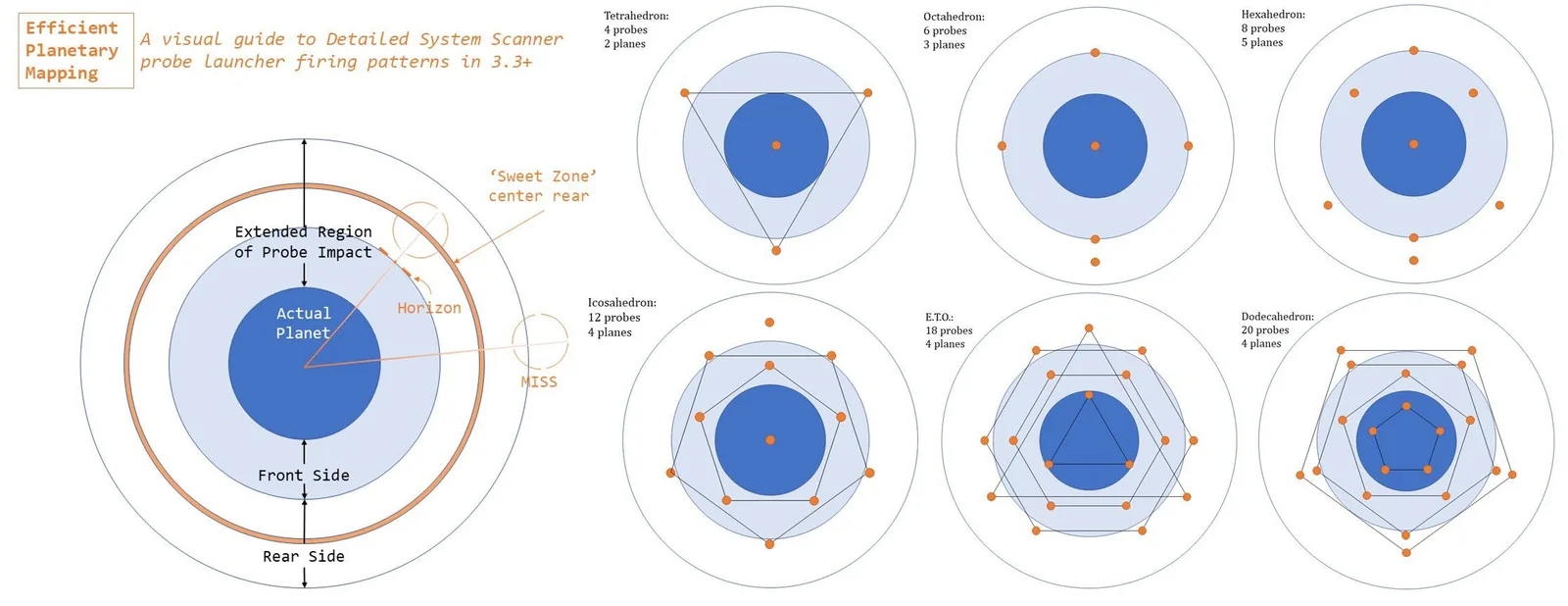
Detailed Surface Scanner (DSS) is an exploration tool to map a planet. You have to be idle in supercruise to be able to use this module, so throttle down to 30.0 km/s. You can only fit one of this module onto any ship.
By flying close to a planet, activating the DSS module allows you to fire probes at a planet to reveal even more information, such as settlements, volcanic activity or even biological points of interest. Aim the probes all around the planet using gravity and scan it to 100%.
To make a bit of extra cash from your surface scan, fire no more than the amount of “Efficiency Target” probes. You can find the information on the bottom right of your screen in the DSS. Different planetary masses require different amounts of probes to obtain the Efficiency Target.
SHIP WEAPONS
Every ship in Elite Dangerous has hardpoints to mount weapons, tools and utilities to help a CMDR and their specialized ship builds. Hardpoints are the places where weapons can be equipped on. Uility Mounts help provide additional defenses and functionality to a ship’s build type.
HARDPOINTS
In PvE two major damage types are relevant, Kinetic and Thermal.
-
Thermal Damage is good against stock shields (aka. the majority of PvE enemies), as these have a weakness to this damage. Thermal Damage is also good against stock hull.
-
Kinetic Damage is bad against stock shields, as these have good resistances against this damage type. Kinetic Damage performs exceptionally good against stock hull.
A mix of the two is great to have, but if only one damage type is chosen thermal is preferable. If mixing thermal and kinetic weaponry, the latter should be put on the larger hardpoints and the former on the smaller.
A balance has to be found between DPS output and ammo dependency. High DPS weapons usually don’t have much ammo. The weapon loadout should be designed with the distributor in mind. As a rule of thumb, anything that cannot be sustained on 4 pips to WEP is too heavy for the distributor and will put you at a disadvantage in high pressure situations.
WEAPON MOUNTING
For all weapons, the preferred mounting type is Fixed. Fixed mounting can be unviable, this could be lack of pilot skill, bad hardpoint convergence, or mixing weapons of different shot speeds.
Upgrading from a Gimballed weapon to a fixed one comes with a bonus of 20% to 50% more damage output, a reduction of 7% in distributor draw and an additional 40% to 80% total damage per ammo pool. Exact numbers vary across weapon sizes and types. Further, fixed weaponry is immune to chaff and has a micro gimbal effect which snaps to target modules within 1°.
Turrets should be avoided. They have bad damage output and slow tracking, so slow that in reality they often end up with less time on target than a gimballed counterpart. All ships in the game handle well enough to subsequently perform better with gimballed and/or fixed weaponry.
IDENTIFYING HARDPOINT PLACEMENT
When fitting fixed weaponry with the goal of firing multiple weapons at once, hardpoint convergence becomes very important. Use the ED Ship Anatomy interactive tool to identify such groups.
SHARED MECHANICS
All non-ordnance hardpoint weapons will have these shared mechanics.
-
Falloff Start : Beyond this range, the actual damage dealt is interpolated between the maximum damage at the falloff start, to zero damage at the weapons maximum range
-
Piercing : When striking an enemy hull, the actual damage dealt can be reduced by the correlation of the weapons piercing vs. the hulls hardness. If the piercing is smaller than the hull hardness, the damage is reduced by the ratio of the piercing and hull hardness, otherwise full damage is dealt.
-
Magazines : All ammo-fed weapons draw from a magazine. Magazines cannot be reloaded or discarded manually. Magazines are replenished from an larger ammo pool reserve.
AVAILABLE HARDPOINTS Here is the list of all of the available hardpoints made available to CMDRs on the market. There are some that can be unlocked from Human Technology Brokers, Guardian Technology Brokers, from Power Play, and pre-engineered weapons.
THERMAL WEAPONS
Pulse Lasers, Burst Lasers, and Beam Lasers all deals 100% thermal damage. All laser weapons rely on energy drawn from the Power Distributor capacitor.
PULSE LASERS
Pulse lasers emits intermittent laser blasts dealing thermal damage to the target. It is especially useful when it is not engineered, more efficient and damaging than beam and burst lasers unengineered. You will get two small fixed pulse lasers that comes inclusive with a new purchased ship.
A Power Play module based off the Pulse Laser is called the Pulse Disruptor, is a module unlocked from Feliclia Winters, which can cause module malfunctions. Engineering the module can have a double effect, however you cannot stack the Spectral Scrambler’s effect with the Disruptor’s existing effects.
For Pulse Lasers, it is recommended to put Rapid Fire, Efficient, or Long Range engineering blueprint modifications on the weapon. The Focused engineering modification is especially handy if you want to convert a pulse laser into a Rail Gun as piercing ratings from a large and huge Pulse Laser exceeds all hull hardness of any ship.
Experimentals like Phasing would be a great pair with Rapid Fire. For all others, Emissive and Scramble Spectrum are other great experimentals to put on a Pulse Laser.
BURST LASERS
A burst laser emits bursts of 3 laser blasts with each intermittent shot. Just like its pulse laser counterpart, the bursts does more damage than its beam laser counterpart.
A Power Play module based off the Burst Laser, called the Cytoscrambler, is a module unlocked from Archon Delaine, which is extremely effective against removing shields. This module requires you to be close range with your target as the effective range of the Cytoscramblers are extremely limited. A good modification recommendation for Cytoscramblers is that you can extend its effect range through the Long Range blueprint modification. If close-combat is something you are comfortable with, Efficient or Rapid Fire are also good modifications to have. A good experimental to put is something called Inertial Impact for close range combat effectiveness.
For Burst Lasers, it is recommended to put the same Pulse Laser engineering recommendations onto Burst Lasers.
BEAM LASERS
Beam Lasers emits a continuous blast of laser making it very high energy consumption weapon to use in combat. Without engineering, it remains the least efficient laser out of the three laser types. The initial contact of the Beam Laser burst is usually the most potent compared to its trail.
There exists a Power Play module that’s based of the Beam laser, called the Retributor, is a module that can be unlocked from Edmund Mahon. The Retributor dumps the target with heat-inducing particles that heat up the target’s ship making it susceptible to heat damage.
A Beam Laser will benefit greatly from using the Long Range engineering blueprint modification, which tied with the Thermal Venting and Thermal Conduit experimental makes the Beam Laser effective in combat. The Efficient blueprint modification should be used only if your ship suffers from massive heat damages.
An experimental called Regeneration Sequence is used to regenerate damaged shield strength of allied ships in your wing. The experimental is highly frowned upon in the PvP community and in Open Play due to its regenerative properties.
KINETIC WEAPONS
Frag Cannons, Multi Cannons, and Cannons all deals 100% kinetic damage. All ammo-fed weapons draw from a magazine. Magazines cannot be reloaded or discarded manually. Magazines are replenished from an larger ammo pool reserve.
FRAG CANNONS
Frag Cannons fire bursts containing 12 projectiles, similar to a shotgun. While each individual projectile has low damage, it can fire three bursts of 12 quickly in a row which can devastate close range targets. However, due to its limited effective range, it drops in effectiveness with long range targets as many of these projectiles will simply miss. Frag cannons are effective against shields although dealing 100% kinetic damage.
Currently in Horizons, large gimballed Frag Cannons are bugged.
The recommended blueprint modification to apply on a Frag Cannon are Overcharged or Double Shot which is often accompanied by experimentals like Corrosive Shell, Incendiary Rounds, Drag Munitions, and Screening Shell. Generally Overcharged is preferred over Double Shot as you have more DPS with the Overcharged modification. Double Shot is more used in PvP, mostly in ganking, as the shots are fired twice in succession of the initial fire making it more guaranteed to hit the target’s ship.
A Power Play module that is based off the Fixed Frag Cannon, called the Pacifier, is a Powerplay module. Since Powerplay 2.0 every Power unlocks it through loyalty ranks (see our Powerplay Modules guide). The Pacifier is a more focused Frag Cannon whereby its effective range is extended thanks to a tightened shot spread.
MULTI CANNONS
The Multi-Cannon is a small caliber machine gun that rapidly fires kinetic projectiles. Multi-cannons consume less power than energy weapons, generate less heat, and have a longer range. The larger the Multi-Cannon size, the longer it takes for the machine-gun to spool up before firing. The only exemption from this spool-up penalty are huge Multi-Cannons, which fire instantaneously.
A Power Play module that is based of the Multi-Cannon, called the Enforcer, is a module unlocked from Simguru Pranav Antal. The Enforcer has a higher DPS but lower rate of fire and only comes as a fixed weapon mount.
The recommended blueprint modification to apply on Multi Cannons is Overcharged which is often coupled by Corrosive Shell, Incendiaries Rounds, Oversized, Auto Loader and Emissive Munitions experimentals. Incendiaries are a very good experimental to put on Multi-Cannons as 90% of the damage is converted from kinetic damage into thermal damage. You can use Multi Cannons to apply a constant status effect on the ship like applying a constant effect of Corrosive Shell, which greatly increases the damage taken of all kinetic damage by 25% and lowers the hull hardness of any ship or Emissive Munitions that envelop the target in heat-particles. For this effect, it is recommended to use a small turreted Multi-Cannon with High Capacity modifications for the Corrosive Shells and Emissive Munitions experimentals.
CANNONS
The Cannon is a heavy projectile weapon that fires large-caliber rounds, dealing kinetic damage. It can inflict significant damage to targeted ship modules and the modules around it. The larger the Cannon size, the slower the projectile shot speed is.
As Cannons are not really used commonly as both the Frag Cannon and Multi-Cannon counterpart does the job more efficiently than Cannons, there is little to no purpose the Cannon serves other than a meme weapon used in PvP or Ganking.
The recommended blueprint modification to apply on Cannons are Long Range or Overcharged. Long Range doubles the projectile shot speed as well as extending its effective range. Some fun experimentals to add on Cannons are Dispersal Field, Force Shell and High Yeild Shell.
RAIL GUN
Rail Guns deals 2/3 (67%) Thermal and 1/3 (33%) Kinetic damage. Rail guns are a hit scan weapon that takes a charge up time before the projectile is fired, requiring the CMDR to stay on the target during the duration of that charge up time. All Rail Guns have a 100 piercing rating which surpasses all hull hardness on any ship making it a great module sniping weapon.
A Power Play module is based off of the Rail Gun, called the Imperial Hammer, which can be unlocked from Arissa Lavigny-Duval. The Imperial Hammer fires 3 bursts of instead of one whole projectile, separating the DPS into 3 portions.
The recommended blueprint modifications for a Rail Gun would be to apply the Long Range modification. The Long Range modification extends both the Rail Gun’s effective range and fall out making micro gimballing more effective at longer ranges. Long Range Rail Guns are best paired with Feedback Cascade and Super Penetrator which are used mostly in PvP, but has applications in PvE combat.
Feedback Cascade disrupts Shield Cell Bank operations by blocking up to 90% of the shield strength it replenishes. Having one size 2 Rail Gun with Feedback Cascade would be good enough to cancel any single Shield Cell Bank up to a size 6. Anything larger would require 2, size 2 Rail Guns or multiple ships with a size 2 Feedback Rail Gun. If the target happens to be banking multiple Shield Cell Banks, which is a common tactic used on Large Ships, then multiple rounds of the size 2 Rail Gun would need to fire to disrupt the majority of a Shield Cell Bank’s operation. If you are using a Feedback Imperial Hammer, you have to land all 3 shots to disrupt a Shield Cell Bank’s operation by up to 90%, if you miss one shot, the disruption effectiveness lowers.
Super Penetrator is an alternative experimental that compliments well with Rail Guns. Instead of the Rail Gun’s projectile only hitting the module directly underneath the point where the projectile lands, it cuts through the ship, damaging all modules directly in its projectile trajectory.
PLASMA ACCELERATORS
Plasma Accelerators deals 20% Thermal damage, 20% Kinetic damage and 60% Absolute damage. It is the only weapon in the game where it can deal absolute damage. Absolute Damage bypasses all resistances and damages the total strength of a shield or hull directly. Plasma Accelerators also consume a lot of energy from the weapons capacitors making them very difficult to maintain in combat situations.
A Power Play module is based off the Plasma Accelerators, called the Advanced Plasma Accelerator, which can be unlocked from Denton Patreus. The Advanced Plasma Accelerators sacrifices damage for higher rate of fire and has a larger magazine size from 5 rounds to 20 rounds making it viable PvE weapon.
The recommended blueprint modification to apply on Plasma Accelerators are the Efficient modification as this modification greatly benefits in lowering the Power Distributor draw and increasing the damage output slightly. Plasma Accelerators are often combined with Thermal Conduits, Target Lock Breaker, Dispersal Field, and Dazzle Shell, all of which are widely used in PvP.
The Focused or Long Range modification is an acceptable experimental to put on some Plasma Accelerators as it guarantees the shot landing on its target more than Plasma Accelerators without it, however the general consensus is to use Efficient to limit the distributor draw.
Per its experimentals, Thermal Conduit is a favourite amongst most PvP players as it deals more damage when the ship’s heat surpasses 100%. The multiplier of the damage scale can be driven up to an additional 50% damage output on top of the damage it is dealing during normal operations.
If a PvP ship is not capable in generating heat effectively, applying the target with three affects can prevent the target from dealing damage onto your ship. Target Lock Breaker (TLB) is an experimental that forces you to break your target lock. TLB is only effective in PvP combat, as it does not work on NPC targets. TLB also has a 5 second cool down, where any additional TLB that a target receives, it has no effect whatsoever. Dispersal Field is an optional experimental to have which disperses the ship’s sensors making it hard to locate an object’s relative position to your ship. Dazzle Shell is a very good experimental if your target has gimballed mounted weaponry, regardless if your target is a CMDR or NPC. Dazzle shell is the equivalent of a Chaff Launcher, it scatters the aiming accuracy of gimballed and turreted weapons, making them effectively useless for a brief period of time.
ORDNANCE WEAPONS
All Missile Racks, Torpedo Pylon, and Mine Launchers all deal 100% explosive damage. All ordnance weaponry uses signification weapon distributor as firing ordnances in quick succession gets very hot. You can still fire any ordnance weaponry, even if the Weapons Capacitor is drained of its energy. Any Ordnance weaponry can be used against Odyssey Settlements as 3 Dumbfire shots can incapacitate infantry and Seekers can target lock Settlement Defenses, Settlement Point Defense, Settlement Ground Turrets, Settlement Temporary Defenses, and Waypoints in Ground Conflict Zones. Seekers do not have the ability to target lock infantry while piloting a ship. The Scorpion’s Seeking Missile Rack is the only viable option to target lock infantries.
MISSILE RACKS
Missile Racks comes in both a seeker variant and dumbfire variant where a High Explosives Missile gets launched from the ship and damages the target’s shields and hull. Seeker Missile Racks have the ability to track its target and land the shot, requiring the CMDR to lock on target before the Seeking Missile can be launched, whereas Dumbfire Missiles relies on manual adjustments to land shots.
A Power Play module is based off the Seeker Missile Rack, called the Packhound, which can be unlocked from Li Yong Rui. The Packhound launches 4 missiles at a time, dealing significantly less damage than its Seeker Missile Rack counterpart but its main object is to overwhelm the Point Defense module. Another Power Play module is based off the Dumbfire Missile Rack, called the Containment Missile, often referred as the “Grom Bomb”, which can be unlocked from Yuri Grom. If the Grom Bomb successfully hits a ship, regardless of it still having shields, it will force a 25 second reboot of the Frame Shift Drive. Since the effect can only be applied every 29 seconds, as the effect of the Grom Bomb is not accumulative in that it resets the timer whenever the targets gets struck by a Grom Bomb, it leaves the target with a 4 second escape opportunity, if not mass locked by a larger ship.
The High Capacity blueprint modifications can greatly benefit both the Seeker and Dumbfire Missile Racks as the expenditure of Missile usage greatly suffers from a lack of ammo pool, making them extremely niche in combat applications. Experimentals like Thermal Cascade, FSD Interrupt are good for Seeker Missiles and Dumbfire Missiles respectively. FSD Interrupt is an experimental that can only go on Dumbfire Missiles which modules that have this experimental are often called the “Baby Grom”. Overload Munitions are good experimentals for effectively damaging shields, and Penetrator Munitions for damaging modules and hull.
A cheaper alternative to the High Capacity blueprint modification is to apply the Sturdy blueprint modifications as Military Supercapacitors are incredibly rare to find. Strudy benefits the thermal loading and penetration of a missile on a ship, making it a good pair with the Penetrator Munitions experimental.
TORPEDO PYLONS
Torpedo Pylons are similar to Seeker Missiles in that they track and attempt to land on the target dealing incredible damage, but are slower in travel speed. Torpedo Missiles are not commonly used in combat applications as they are very limited in ammo stock, the projectile speed is slower than most ships, and the ammo pool cannot be replenished using synthesis. Therefore, the only good blueprint modification and experimental to put on a Torpedo Pylon is the Sturdy blueprint modification with the Reverberating Cascade experimental. Reverberating Cascade is an experimental that damages the integrity of shield generators directly, which can cause the shields of a ship to drop suddenly.
The number of Reverberating Torpedoes needed to sufficiently damage a ship’s Shield Generator is dependent on the size of the shield. Generally:
- A size 8 Shield Generator will require 6 Torpedoes to damage the module.
- A size 7 Shield Generator will require 4 Torpedoes to damage the module.
- Any Shield Generators under Size 2 will require at least 2-3 Torpedoes to damage the module.
MINE LAUNCHERS
Mine Launchers are similar to the principle of a real life landmine counterpart, in that it explodes based off the proximity of the mine’s relative position to a ship. Mine Launchers are also a niche counterpart to the Missile Rack as it doesn’t really serve a good purpose in combat situations. It is more used in roleplaying situations like carpet bombing settlements and in meme PvP builds. Mines can be an especially useful tool in dislodging crystal shards from the Crystalline Forest sites.
The only recommended engineering for Mine Launchers are the High Capacity blueprint modification with Reverberating Cascade. It takes more Reverb Mines to damage a ship’s shields than it takes for a Torpedo to do the same.
EXPERIMENTAL WEAPONS
Experimental weapons are weapons that can be unlocked from Human Technology Brokers, including those that are pre-engineered. These are:
SHOCK CANNONS
Shock Cannons are rapid-fire semi-automatic weapons that fire fast-moving energized projectiles, dealing kinetic damage on impact. They also have a built-in reloading system that replenishes ammunition automatically even when the weapon is being discharged.
REMOTE RELEASE FLECHETTE LAUNCHERS
Remote Release Flechette Launcher is an version of the Remote Release Flak Launcher whereby holding down the weapon fire will launch a dumbfire missile and when in range, the indicator will flash red alerting the player to release and detonate the missile. Releasing the fire button in close proximity to a shielded target will cause the target to receive hull and module damage. It has a 100% chance per hit to cause a hull break, which increases damage dealt to the modules of a target vessel from all other weapons.
ENZYME MISSILE RACKS
The missiles cause low damage on impact, but are tipped with Thargoid-derived enzymes that corrode the target’s hull over time applying a caustic burn effect. However this effect does not last permanently if the effect is applied once. Continuous bombardment of the Enzyme Missile Rack will have the caustic effect be applied constantly until the target suffers complete hull loss. Enzyme also deals damage to a Thargoid hull as enzyme to a Thargoid’s hull is the same to regular missile racks to a ship’s hull.
AX WEAPONRY
AX Weaponry comes in three forms of weaponry, advanced weapons, AX-specialized weapons, and Guardian weapons. You can only have up to 4 AX weapons installed on one ship.
ADVANCED WEAPONS
Advanced weapons are the weakest and most inefficient in terms of dealing acceptable damage to Thargoid vessels. Advanced weapons can be engineered likes its original counterparts, and the Advanced Missile Rack has a larger ammo reserve pool than its normal counterparts. These weapons are not recommended to be used in AX combat.
AX SPECIALIZED WEAPONS
AX Specialized Weapons are the next best thing if you have yet to get the Guardian Weapons unlocked. There are three AX Weaponry that’s available to the CMDR through the Outfitting market. The AX Multi-Cannon, AX Missile Rack and the Remote Release Flak Launcher. Both the AX Multi-Cannon and Missile Rack have a Fixed and Turreted Mount. Even though, the AX Multi Cannon and Missile Rack are more effective than their Advnaced Weaponry counterparts, they are still not recommended for novice AX combat CMDRs to use when beginning in AX combat.
The Remote Release Flak Launcher is a manually-releasing missile that holding down the weapon fire will launch a dumbfire missile and when in range, the indicator will flash red alerting the player to release and detonate the missile into shards. The Remote Release Flak Launcher is most effective against Thargoid Swarms.
GUARDIAN WEAPONS
Guardian Weapons are by far the most effective weapons used against the Thargoid Threat. Guardian weapons can be unlocked and equipped at any stations with a Guardian Technology Broker. There are three Guardian Weapons that can be unlocked from these services.
-
Guardian Plasma Charger : Guardian Plasma Chargers are nominally similar to the Plasma Accelerator. Guardian Plasma Chargers deal less damage and cannot be engineered. However, they offer some benefits, such as reduced heat generation, greater ammo count, and higher projectile speed.
-
Guardian Shard Cannon : The Guardian Shard Cannon functions similarly to a Fragment Cannon, where it can damage both the Thargoid’s shield and hull. A pre-Engineered Class 1 and Class 2 Guardian Shard Cannons with Focused, Long Range, and Penetrator Munitions named “Modified Shard Cannon” or “Salvation Shard Cannons” can be purchased at Bright Sentinel and Prospect’s Deep in Mbooni.
-
Guardian Gauss Cannon : Compared to a conventional Railgun, the Gauss Cannon draws more power, generates more heat, penetrates a Thargoid’s hull more effectively, deals somewhat more damage, and has a longer range before damage fall off begins. A pre-Engineered Class 1 and Class 2 Guardian Gauss Cannons with High Capacity and a special Burst Fire, similar to that of the Imperial Hammer Rail Gun, named “Modified Gauss Cannon”, “Salvation Gauss”, or “Hammer Gauss” can be purchased at Bright Sentinel and Prospect’s Deep in Mbooni.
MINING TOOLS
There are four mining tools a CMDR can equip for their mining outskirts. These tools are the Mining Laser, Abrasion Blaster, Sub-Surface Displacement Missile, and Seismic Charge Launcher.
MINING LASER
The Mining Laser is used to heat up surfaces of asteroid surfaces to break off tiny mining fragments which are then collected, processed, and refined. A Power Play module based from the Mining Laser, called the Mining Lance, is a mining laser that can mine with a range up to 2 km, can deal effective thermal damage and is unlocked by supporting Zemina Torval.
A pre-engineered Class 1 Mining Laser with Long Range and reduced Distributor Draw named “Modified Mining Laser” can be purchased at:
- Zetian’s Recall in the LTT 198 system
- Pride of Bitterwood in the EGM 559 system
- Champion of Commerce in the Laguz system
- The House Ascendant in the 21 Eridani system
ABRASION BLASTER
The Abrasion Blaster is a mining tool that blasts surface deposits chunks off of an asteroid’s surface, which are then collected, processed and refined.
SUBSURFACE DISPLACEMENT MISSILE
Sub Surface Displacement Missiles are mining extraction tools used to extract chunks from sub-surface deposits underneath the surfaces of asteroids which are then collected, processed and refined.
SEISMIC CHARGE LAUNCHER
Seismic Charge Launchers are mining extraction tools used to set detonation charged on fissure anchor points of asteroid to free up the core mineral contents of an asteroid. Freed up chunks are then collected, processed and refined.
UTILITY MOUNTS
Utility modules help provide additional functions to your build. There are 11 utility modules that provide the ship with more tools, defense aids and protection.
- Chaff Launcher
- Electronic Countermeasure
- Frame Shift Wake Scanner
- Heatsink Launcher
- Kill Warrant Scanner
- Manifest Scanner
- Point Defense
- Pulse Wave Analyzer
- Shield Booster
- Shutdown Field Neutralizer
- Xeno Scanner
CHAFF LAUNCHER
Chaff Launcher are the equivalence to Flares used in combat in real life. It scatters the tracking assists of all gimballed and turreted mounted weaponry. Deselecting the target will stop making the gimballed and turreted weapon trackers jitter. The Chaff Launcher requires there to be energy in the Systems Capacitor. Chaff is extremely useful to small ships as smaller ships have a tiny hitbox in comparison to the larger ships.
Usually, the recommended engineering blueprint modification that’s required for the Heatsink Module is Ammo Capacity for combat applications.
ELECTRONIC COUNTERMEASURE
Electronic Countermeasure (ECM) is a defensive utility used to disable any heat-seeking missiles and torpedoes and hatch breaker limpets by emitting an electronic pulse wave up to 3 km. By holding the ECM’s charge will increase the range up to 3 km. The module has a 10 second cooldown before it can be redeployed again. The ECM unit also consumes energy from the Systems Capacitor
FRAME SHIFT WAKE SCANNER
The Frame Shift Wake Scanner scans for wake signals when a CMDR or NPC high wakes out of the system. It is especially useful in chasing wanted criminals, and is rarely used in mercenary and combat-related missions.
HEATSINK LAUNCHER
A Heat Sink launcher absorbs all the heat on the ship and transfers it to a Heat Sink, which is then ejected, depleting all the heat on the ship. A Heat Sink can absorb as much as 160% - 200% heat depending on the ship’s thermal loading capacity and overall heat producing modules. Heat sinks are especially useful during Shield Cell Bank operations and in AX combat when engaging the Thargoid. It can be a helpful module used in exploration and trading.
Usually, the recommended engineering blueprint modification that’s required for the Heatsink Module is Lightweight for exploration, and Ammo Capacity for combat applications.
KILL WARRANT SCANNER
The Kill Warrant Scanner scans for all active bounties a ship or CMDR has regardless of a ship’s clean or wanted title. Ships with a clean status having their titles be changed to “Warrant” indicates an active bounty present, which makes you, the bounty hunter, exempt from receiving a bounty for assaulting a clean ship. However, it does not exempt you from engaging with local power play security forces should the ship’s representing faction has an allegiance to a power play faction that has coverage over the system you were bounty hunting in.
Kill Warrant Scanner is usually a negative influencing activity that diminishes a controlling faction’s influence by distributing a faction’s lost influence to its other factions present in the system as you are handing in combat bounties from other factions. If you are using the Kill Warrant Scanner just for combat applications, it is more advantageous to fit a Shield Booster over this module as additional protection is almost always beneficial to a ship’s survivability.
MANIFEST SCANNER
The Manifest Scanner scans all contents of a ship’s cargo hold and its passenger should the ship be ferrying tourists.
POINT DEFENSE
Point Defense is an automatic and passive module that attempts to destroy and ordnance projectiles, including limpet controllers, before the object reaches the ship. Usually, the recommended engineering blueprint modification that’s required for the Heatsink Module is Ammo Capacity for combat applications.
PULSE WAVE ANALYZER
The Pulse Wave Analyzer (PWA) is a mining tool that helps differentiate asteroids of its sub-surface deposits from surface only prospecting asteroids. It scans nearby asteroids and indicating its motherlode deposits by highlighting asteroids based on the amount of sub-surface deposits it has. The more intense the color of the asteroid glows, indicates that the asteroid has a core mineral at its center.
SHIELD BOOSTER
Shield Boosters help supplement additional shield protection of a ship’s shield strength, without the need of adding more Guardian Shield Reinforcement Packages. Buying and engineering E-rated shield generators are recommended for non-combat ships as E-rated Shield Booster are the lightest in class. The recommended engineering blueprint modification to be applied on Shield Boosters on non-combat ships are Heavy Duty with Super Capacitors.
In Combat, the layout of a ship’s Shield Boosters coincides with the Shield Generator the ship has. Shield Boosters are generally chosen as A-rated, however should the ship suffer in power management, lower grade Shield Boosters work just as well. If you want only the resistances and no additional shield strength, engineering E-rated Shield Boosters would be a great choice.
If the ship is using a high-strength Reinforced Bi-Weave or Prismatic Shield build, the layout of the shield boosters should have these modifications:
For Ships with 8 Utility Mounts
- 2 Shield Boosters with Resistance Augmented and Super Capacitors.
- 1 Shield Booster with Thermal Resistant and Super Capacitors.
- All the rest, Shield Boosters with Heavy Duty and Super Capacitors.
For Ships with 4 or 6 Utility Mounts
- 1 Shield Boosters with Resistance Augmented and Super Capacitors.
- 1 Shield Booster with Thermal Resistant and Super Capacitors.
- All the rest, Shield Boosters with Heavy Duty and Super Capacitors.
If the ship is using a fast charge Thermal Resistant Bi-Weave Shield build, the layout of the shield boosters should have these modifications:
For Ships with 4 to 8 Utility Mounts
- 2 Shield Boosters with Resistance Augmented and Super Capacitors.
- All the rest, Shield Boosters with Heavy Duty and Super Capacitors.
For Ships with less than 2 Utility Mounts
- All the rest, Shield Boosters with Resistance Augmented and Super Capacitors.
If the ship is using a fast charge Reinforced Bi-Weave Shield Build, the layout of the shield boosters should have these modifications:
For Ships with 6 to 8 Utility Mounts
- 2 Shield Boosters with Resistance Augmented and Super Capacitors.
- 1 or 2 Shield Booster with Thermal Resistant and Super Capacitors.
- All the rest, Shield Boosters with Heavy Duty and Super Capacitors.
For Ships with 4 or less Utility Mounts
- 1 Shield Booster with Thermal Resistant and Super Capacitors.
- 1 Shield Booster with Resistance Augmented and Super Capacitors.
- All the rest, Shield Boosters with Heavy Duty and Super Capacitors.
Shield Booster are almost always beneficial to put on a ship’s utility mount over any of the ship’s defenses modules as additional protection in shields greatly benefits the longevity of a ship’s survivability rate. This recommendation holds true for all ships in all disciplines of combat, including ships that can Shield Tank in AX combat.
SHUTDOWN FIELD NEUTRALIZER
The Shutdown Field Neutralizer is used only in AX combat to neutralize a Thargoid’s secondary EMP attack which disables ships temporarily. The module is extremely useful in AXCZ’s and AX Wing sessions.
The module works like an ECM whereby it protects you and those around you in a 3 km radius. If two EMP attacks were to trigger in succession, holding down on the Shutdown Field Neutralizer’s charge will protect you from both attacks. Disengaging the charge when an EMP attack passes through you, you will still be affected by its shutdown effect.
XENO SCANNER
The Xeno Scanner helps retrieve data about a Thargoid Vessel so that you can sub-target its hearts, reveal its shield strength, categorizes its variant, and indicate its hull strength. This module is especially useful when a CMDR fights a Hydra their first time to see where the exerted heart is.
STORED MODULES
You can store up to a maximum of 200 modules. You can store multiple modules at once by going into the Stored Modules tab and selecting the modules that needs to be stored. However there is a loop hole with this system, as you can easily store an infinite amount of ships with modules stored on them, making the module storage service effectively useless. The only use for a module to be stored is if you are expected to transfer those modules individually.
You can also store your modules on another CMDR’s fleet carrier is they have the outfitting services be equipped on their Fleet Carrier’s services. Only Fleet Carriers owners have the ability to store modules on their carrier without the Outfitting service be equipped.
Storing modules from a ship’s Core Internals will replace the stored module with the ship’s default module. The replaced default module cost will be deducted from your credit reservoir.
SHIPYARD
The Shipyard is a service made available to CMDRs to purchase, store, transfer, and sell ships. There are now more than 45 ships that you can buy in Elite Dangerous (10 new ones since 2024). Selling ships with upgraded modules will net you a 75% refund. If you sell modules, you’ll get a 100% refund therefore, it is recommended to sell modules independently.
REBUY INSURANCE
All outfitting modules purchased through shipyard carries through with the rebuy cost of a ship, where the rebuy is the insurance cost of a ship should you accidently destroy your ship. Rebuy is directly responsible in buying back your ship, as you’ll lose everything if you decide to lose your ship, as the same thing will happen if you sell your ship by accident. Rebuy takes 5% of the total cost of your ship, meaning if you buy modules at the discounted price, the rebuy will be cheaper to insure. Here are some of the discounted places that offer cheaper modules:
The Power discounts in this list date from Powerplay 1.0 and may have changed.
- -2.5% discount : on everything once attained Elite Rank on the five pilot roles
- -10% discount : any imperial ships obtained from systems controlled by Denton Patreus
- -10% discount : any imperial ships obtained from accessing Henry O’Hare’s hanger in Summerland
- -10% discount : only at Jameson Memorial at Shinrarta Dezhra, a station requiring a permit and has all ship modules
- -10% discount : any in-stock weapon modules from a station in a system exploited by Zachary Hudson
- -15% discount : any in-stock modules from a station in a system exploited by Li Yong Rui a good station would be Ray Gateway in the system of Diaguandri
- -20% discount : any in-stock wepaon modules from a station in a system controlled by Zachary Hudson
- -20% discount : selective ships from Attilius Orbital in CD-42 11917
- -30% discount : selective fixed and gimball weaponry, up to medium class, from Attilius Orbital in CD-42 11917
Then there are stations that offer modules at a premium
- +20% premium : I Sola Prospect in Brestla has every module and ship in stock however comes at a premium, even if controlled or exploited by Li Yong Rui
REPAIR, REARM, REFUEL
Repair, Rearm and Refuel comes as a standard service that’s available for all major stations. For outposts, these amenities are a luxury optional that not all outposts will have. Fleet Carrier will also have these services made available to them if they have the services installed on them.
ADVANCED MAINTENANCE
Advanced Maintenance is an advanced repair service that repairs the internal structural integrity of a ship. Jumping and damage taken by internal and external attacks all contribute to lowering the integrity of the ship. Lower ship integrity means that the ship is easily subjected to damage taken, weakening the ship.
BUILD PRACTICES
When you build up a ship, even on ship building tools like ED Shipyard or Coriolis, the first thing to upgrade is your Frame Shift Drive. The limiting factor in this game is a ship’s fuel, it limits you by how much time you can spend operating your ship, and it limits how far you can go. Increasing jump range can help jump your ship across the bubble faster and by spending less time to take care of your fuel expenditures, visiting engineer bases to apply your experimentals.
The last thing to upgrade is your ship’s power plant as you can determine which power plant size you would use for everything that is powered on your ship. If you are having power overloading issues, you should learn to power manage modules that are not used for your type of activity. Power manage also automatically shuts down irrelevant modules when you deploy your ship’s hardpoints.